# Introduction
The sorting options in the customization are crucial to fine-control. Using word and line sorting, you can not only modify individual characters, but whole words and lines together, easily.
You can enable the sorting like this:
Text.Create(
	"This text is awesome!",
	frame,
	{
		LineSorting = true,
		WordSorting = true
	}
)
By default, line and word sorting will both be off, meaning your frame will contain pure characters.
{% hint style="info" %}
All instances are named numerically, relative to its parent.
{% endhint %}
Both lines and words will be sorted using folders:\ 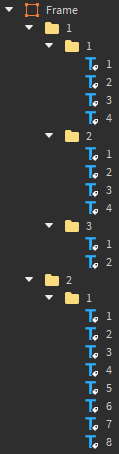 \
\&#xNAN;*(Full sorting on)*
\
\&#xNAN;*(Full sorting on)*